How to access end-of-training reports
Once the training course is over, the course coordinator, with inputs from the instructor(s) should submit your end-of-training report through the ITU Academy, no later than one month following a course end-date.
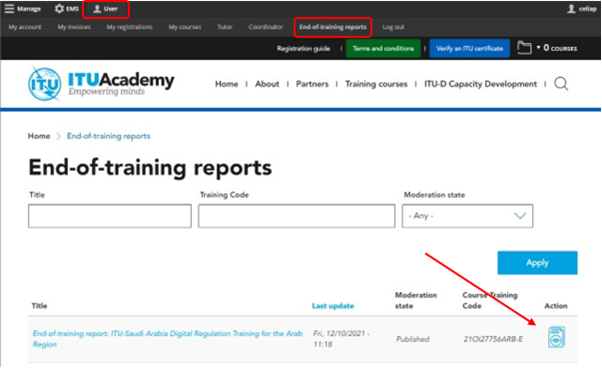
- Under “User”, navigate to the “End-of-training reports” tab
- Locate the course in the list and click on the icon to edit the report
- Once your report is ready you can submit it. It will be validated by the ITU Academy team. You can also download a pdf version of the report.
The end of training report is divided into 4 sections.
- Course information: automated, this section provides basic data about the course and automatically loads organizers and partners logos.
- Participants and evaluation: automated, this section provides overall demographic and completion data for the course as well as individual grades for all participants. this data is calculated once the course grading has been verified by an ITU Academy team member. The information is therefore only available when this verification has been done, but you can start working on the report before then.
- Training evaluation: is the substantive part for coordinators to fill.
- Evaluation of the training: Capture feedback regarding the instructor and the facilitation approach (analyse the section “training delivery” of participants’ responses to the course evaluation form).
- Evaluation of the facilitation: Include a summary of the recommendations for this training. Make sure to capture both lessons learned from the instructor(s)/tutor(s) lessons learned and the suggestions emerging from the participants via their inputs to the qualitative (free text) questions of the course evaluation form.
- Recommendations: Refer to the question “Please mention other areas of training that you would like to have” in the course evaluation form and summarize here the proposed training identified by participants.
- Proposed future training courses: From the feedback form provided by participants, the proposed trainings should be identified and provided in this section of the report. This refers to the last question of the feedback form.
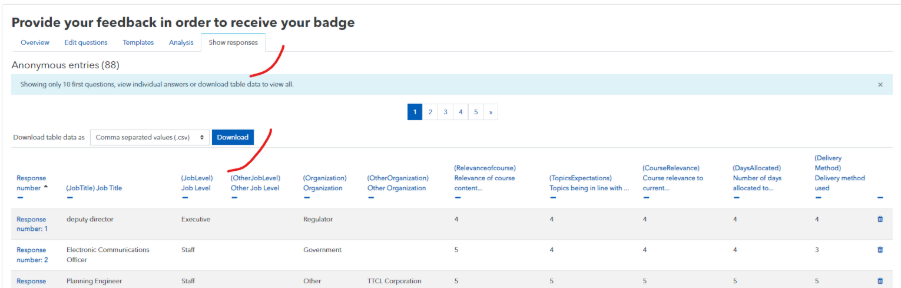
- To access this data, go back to your course Moodle page and enter the feedback activity and go under “Show responses”> download table data. From there you can report the averages for each question and analyse comments from participants.
- Financial documentation: if fees were gathered by the ITU Academy Training Centre, please attach a signed/stamped document specifying the details of each payment (participant name, fee collected, currency, etc).
To submit your end-of-training report, click on “Change to” and select “Validation”. Note this can only be done once.